Add Daily Sales Report
Access: Click Reports > Sales Reports > Submit Sales Report Role Required: Admin, Manager
Submitting this report is required every day. Make sure to submit your sales report at the end of each business day.
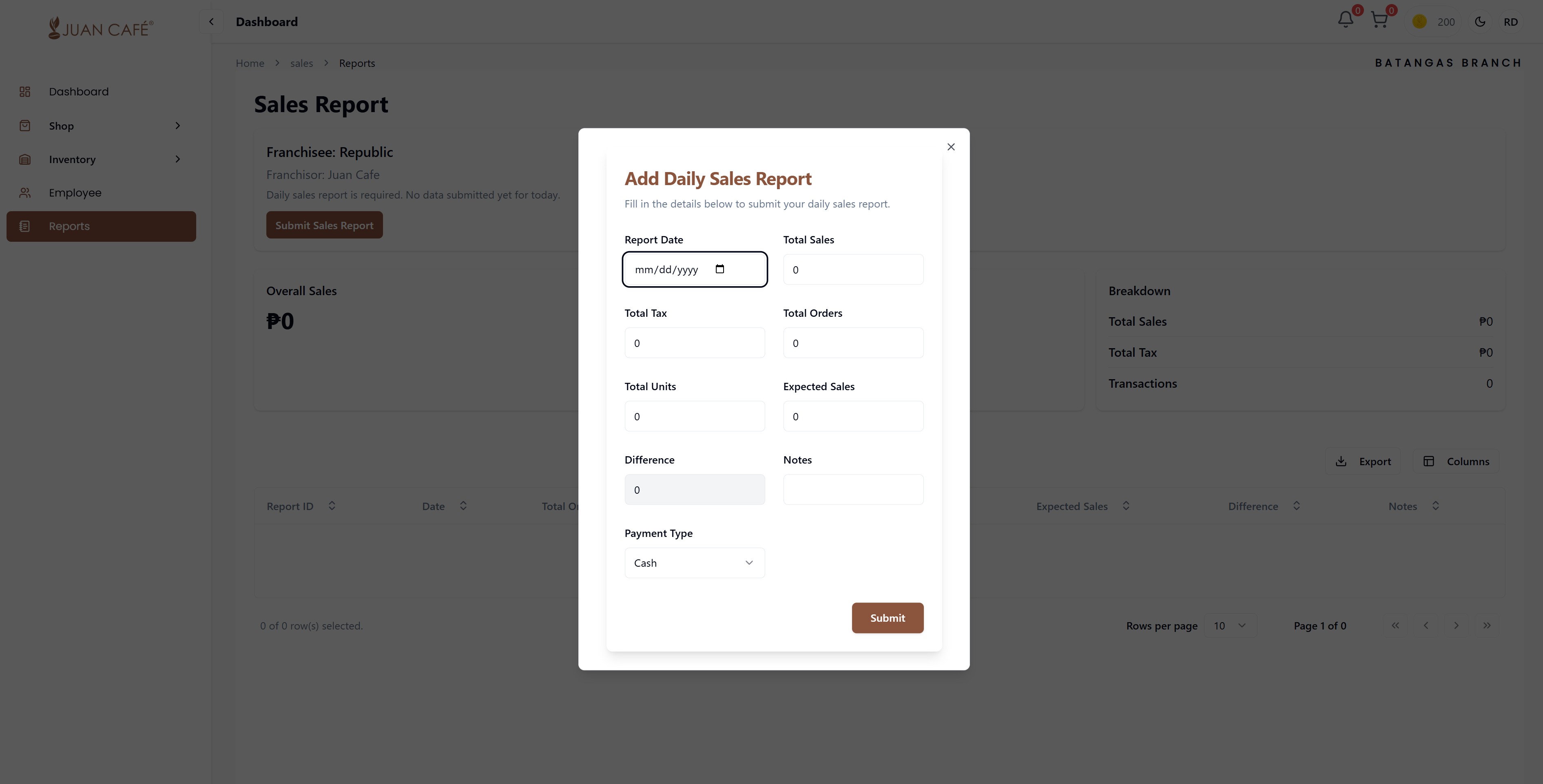
This section is where you enter your branch's daily sales details.
Overview
To submit a new sales report:
- Navigate to Sales Reports page
- Click Add Sales Report button
- The sales report form opens
Sales Report Form Fields
Here's what you need to fill out:
1. Report Date
- Select Date: Choose the date for the sales report
- Default: Today's date
- Past Dates: You can report for previous dates if needed
- Format: dd/mm/yyyy
2. Total Sales
- Enter Amount: Total revenue for the day
- Before Tax: This is the gross sales amount before any taxes
- Include: All sales transactions for the day
- Currency: Enter in Philippine Peso (₱)
3. Total Tax
- Add Tax Amount: VAT or sales tax collected
- Separate from Sales: Enter only the tax portion
- Calculate: Typically 12% VAT in the Philippines
- Accurate Reporting: Essential for compliance
4. Total Discount
- Include Discounts: Any discounts applied during the day
- Types: Senior citizen, PWD, promotional discounts
- Total Amount: Sum of all discounts given
- Separate Line: Keep distinct from total sales
5. Total Units
- Enter Number: Total number of items sold
- Count All: Include all products sold that day
- Individual Items: Each item counts as one unit
- Physical Count: Based on actual items sold
6. Expected Sales
- Target Amount: Your projected/target sales for the day
- Comparison: Used to calculate variance
- Business Planning: Based on historical data or targets
- Optional: Can be blank if no target set
7. Difference
- Auto-Calculated: System shows difference between actual and expected sales
- Positive: Over target (good performance)
- Negative: Under target (needs attention)
- Automatic: No manual entry needed
8. Payment Type
- Select Method: Primary payment method used
- Options: Cash, Card, GCash, Maya, Online Payment
- Multiple Methods: Choose predominant payment type
- Dropdown: Select from available options
9. Notes
- Additional Details: Any relevant observations or comments
- Optional: Not required but helpful
- Examples: "Heavy rain affected sales", "Holiday promotion", "New product launch"
- Context: Helps explain unusual variances
How to Submit
- Fill All Required Fields: Complete all mandatory fields (marked with *)
- Verify Amounts: Double-check all financial figures for accuracy
- Review Totals: Ensure calculations are correct
- Add Notes: Include any relevant context or observations
- Click Submit: Click the Submit button to save the report
This form ensures accurate daily reporting and helps monitor your branch's performance.
After Submission
Once you submit your sales report:
- Saved in System: Report is recorded in the database
- Report ID Generated: Unique identifier assigned to the report
- Status: Report status is set to "Pending" or "Submitted"
- Visible in List: Appears in your Sales Reports table
- Can Be Edited: You can edit or update the report if needed
- Performance Tracking: Data contributes to your branch analytics
- Historical Record: Becomes part of your sales history
Sales Report Metrics
The system automatically calculates and displays:
- Variance: Difference between actual and expected sales
- Variance Percentage: Performance metric compared to target
- Daily Trends: Sales patterns over time
- Cumulative Totals: Running totals for the month/year
- Tax Summary: Total taxes collected
- Units Sold: Total items sold
Best Practices
- Submit Daily: Complete the report every day at close of business
- Be Accurate: Double-check all amounts before submitting
- Include Notes: Add context for unusual days or variances
- Set Realistic Targets: Base expected sales on historical data
- Keep Backup: Maintain physical records (receipts, POS reports)
- Timely Submission: Submit before end of day or early next morning
- Review Trends: Check your reports regularly to identify patterns
Common Mistakes to Avoid
- Missing Tax: Don't forget to separate and include tax amount
- Wrong Date: Ensure you're reporting for the correct date
- Calculation Errors: Verify your math before submitting
- Incomplete Data: Fill all required fields
- No Notes: Missing context for unusual variances
Submit sales reports daily at close of business to maintain accurate records and timely analytics. Consistent reporting helps track performance and identify trends.
This report is mandatory daily. Missing sales reports can affect your franchise standing and may be flagged by management. Ensure you submit every single day.