Payment Processing
Access: Click Shop > Process Payment in the sidebar menu Role Required: Admin Only
This section is where you process payments for approved orders. Only Admin users can process payments.
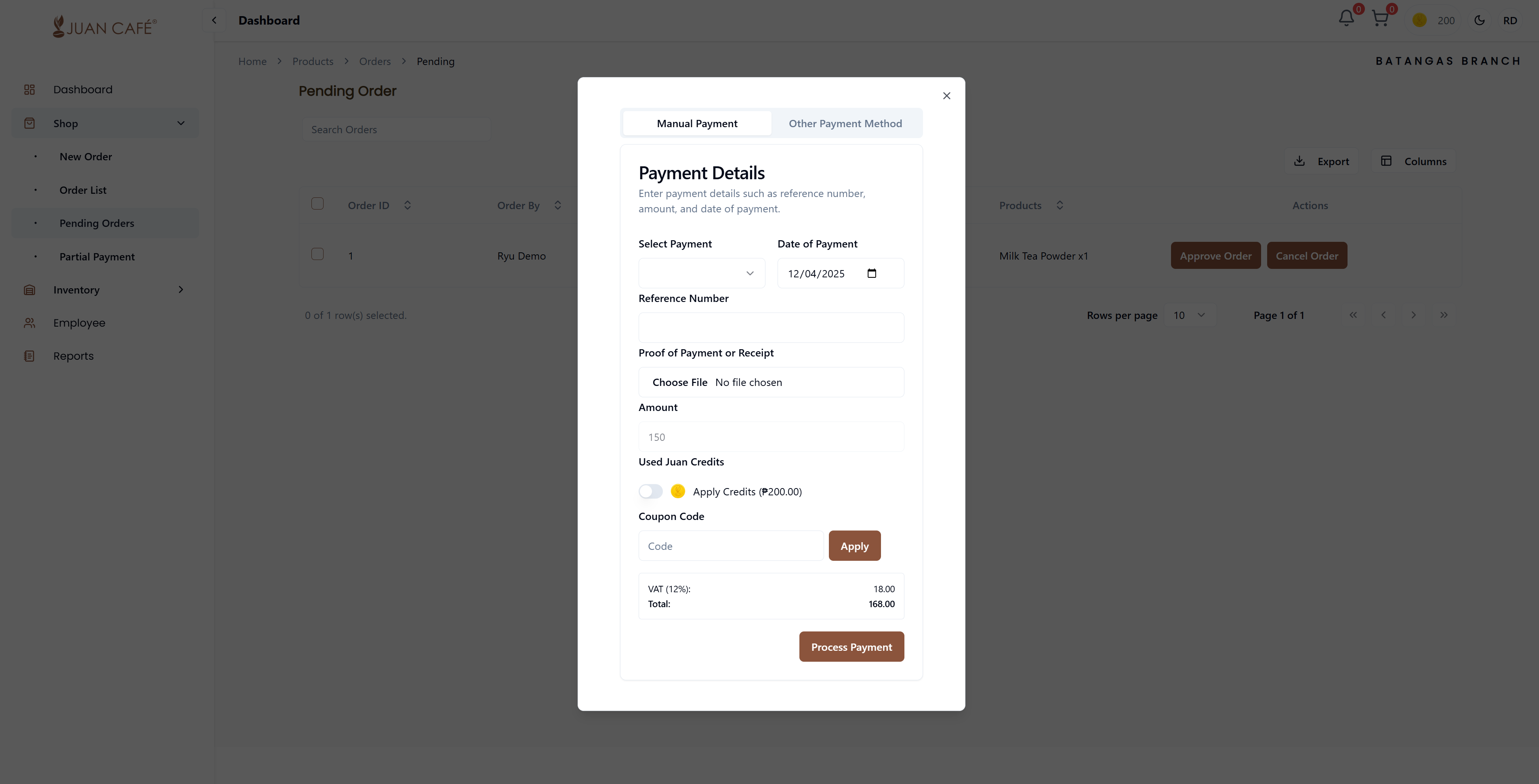
Overview
This page ensures you can pay for orders easily and securely using your preferred method. Process payments for approved orders by entering payment information and choosing your payment method.
How to Process Payment
Select Payment Method
Choose between available payment methods:
-
Manual Payment: For bank transfers, checks, or cash payments
- Select this option if you're paying through bank deposit, check, or cash
-
Juan Credits: Use your franchise credit balance
- Credits can be earned through refunds or bonuses from the franchisor
- Credits work as real money in the system
-
Online Payment: Using your configured payment method
- Uses the payment method you set up in Settings > Account > Payment Details
- Can be PayMongo, credit card, GCash, or other online options
Enter Payment Details
Fill in the required information:
- Reference Number: Transaction ID, check number, or payment reference
- Date of Payment: Select the date when payment was made
- Upload Proof: Attach receipt, bank slip, or payment confirmation
- Accepted formats: JPG, PNG, PDF
- Make sure the proof is clear and readable
Review Payment Summary
Before finalizing, review:
- Subtotal: Base amount before taxes
- VAT: Tax amount (if applicable)
- Total Amount: Complete amount to be paid
- Payment Method: Confirm selected payment method
- Applied Credits: If using Juan Credits, see the amount being used
Payment Options
You can choose to:
- Use Juan Credits Only: Pay entirely with your credit balance
- Use Actual Money Only: Pay using manual or online payment methods
- Combine Both: Use credits and pay the remaining with actual money
Process Payment
Once all details are filled out:
- Review all information carefully
- Click Process Payment to finalize the transaction
- Wait for confirmation message
- Payment receipt will be generated
After Processing Payment
Once payment is processed:
- Order status updates to "Paid"
- Payment confirmation is sent to your email
- Order proceeds to preparation and shipping
- Receipt is available for download in the Orders section
- Transaction is recorded in your payment history
Juan Credits System
What are Juan Credits?
Juan Credits are the internal digital currency used within the system to provide discounts and process payments for franchisee orders.
How to Earn Credits
- Receive refunds for returned items
- Get credit bonuses from the franchisor
- Participate in promotions and rewards programs
How to Use Credits
- Apply credits during payment processing
- Spend credits as real money for purchases
- Combine credits with other payment methods for flexibility
Checking Your Credit Balance
- View current balance on the payment screen
- Check credit history in Account Settings
- See credit transactions in the transaction history
Payment Methods in Detail
Manual Payment
Best for:
- Bank transfers
- Check payments
- Cash deposits
Requirements:
- Reference number (transaction ID or check number)
- Proof of payment (receipt or bank slip)
- Date of payment
Online Payment
Best for:
- Quick processing
- Automatic confirmation
- Digital receipts
Requirements:
- Payment method configured in Account Settings
- Valid payment credentials
- Internet connection
Best Practices
- Verify Amounts: Always double-check the total amount before processing
- Keep Receipts: Save all payment proofs for your records
- Use Credits Wisely: Plan when to use Juan Credits for maximum benefit
- Timely Payment: Process payments promptly to avoid delivery delays
- Clear References: Use clear, identifiable reference numbers for easy tracking
You can use Juan Credits as real money or combine them with other payment methods. This gives you flexibility in managing your branch expenses.
All payments are processed securely with encryption. Your payment information is protected and recorded for complete audit trails.